Free
$0
10 pages in total
1 device
Start in the desktop app ↗
FOR INDEPENDENT BOOKKEEPERS
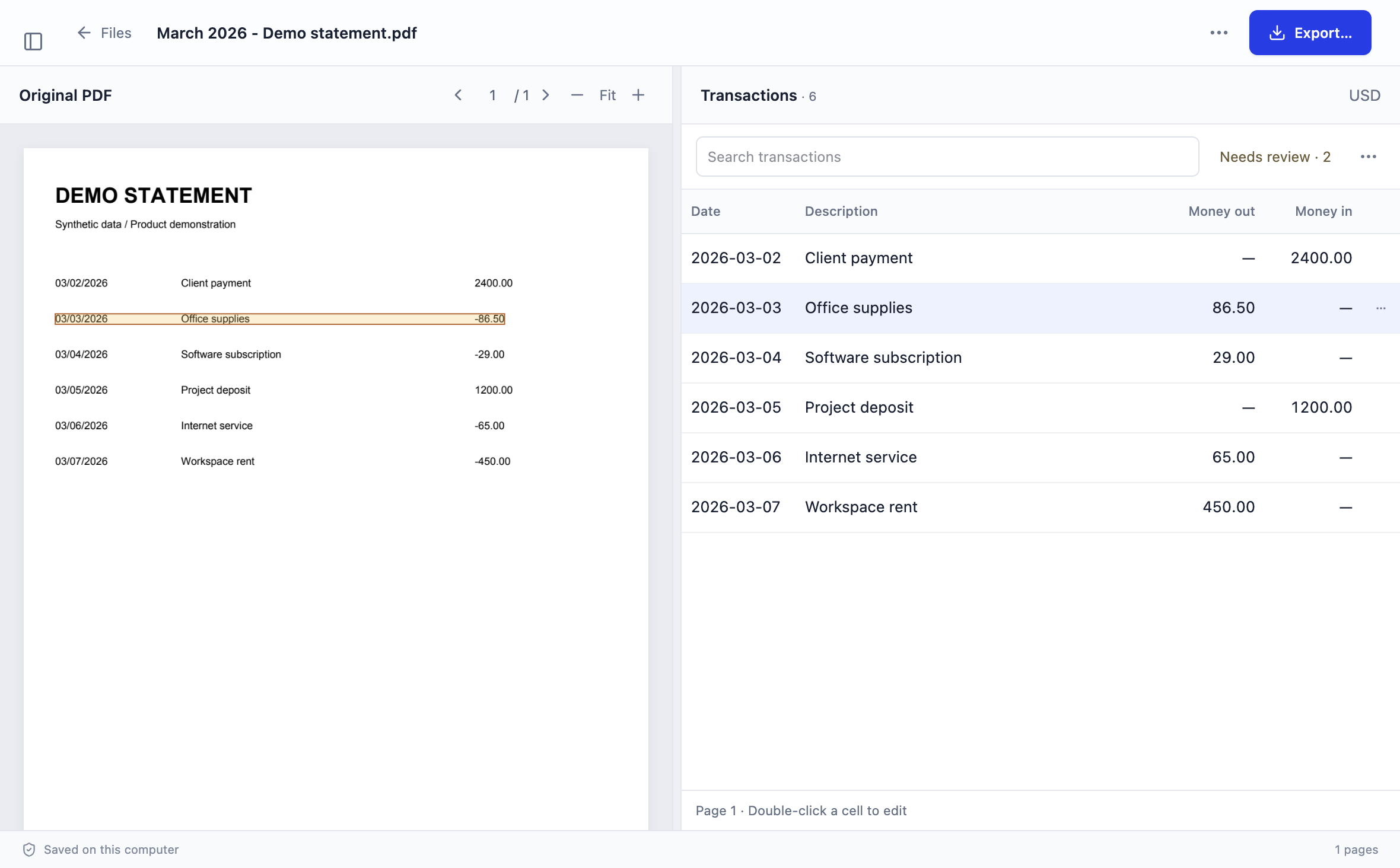
Turn client bank statement PDFs into reviewable transactions on your Windows or Mac computer. Queue files, compare dates, descriptions and amounts beside the original PDF, and export CSV or Excel for the next step in your bookkeeping workflow.
Windows x64 · macOS Apple silicon and Intel · Stmtio 0.1.0 Preview · Unsigned installers
A REPEATABLE CLIENT WORKFLOW
Use your agreed client intake channel. Record the client/account alias, currency, statement dates, expected pages and any records already in the books. Save the originals unchanged; request missing periods and obtain known PDF passwords through your agreed process.
Try one representative PDF first. Select the intended pages, then queue the remaining files in client/account work groups. Follow progress and return to saved results. Failed or partial files remain open work; review or resume them before calling a period complete.
Check every page for missing or repeated transactions, dates, wrapped descriptions and signed amounts. Correct fields and revisit column mapping where needed. Keep a separate monthly count/balance control and record unresolved questions for the client.
Inspect the export preview and save CSV or XLSX for each conversion result. Reopen the saved file and verify its rows, dates and signs. Keep source references and exception notes in your own register, then prepare the recipient’s requested import copy.
Use the catch-up bookkeeping guide for missing months and an exception-aware handoff, and the source review checklist before exporting. Scanned pages can use local OCR; recognition still needs your review.
SYNTHETIC WORKLOAD EXAMPLE
Suppose each of four clients provides three monthly PDF statements, each five pages long. The aliases and counts below are invented for workload planning. They are not customer results, a measured completion time or evidence that every document will convert correctly.
| Client alias | Statements | Pages per statement | Selected pages |
|---|---|---|---|
| Client A | 3 | 5 | 15 |
| Client B | 3 | 5 | 15 |
| Client C | 3 | 5 | 15 |
| Client D | 3 | 5 | 15 |
| Total to plan | 12 | Varies with the actual PDFs | 60 |
12 PDFs × 5 pages = 60 selected pages. This fits below the current 500-selected-page run limit, but exceeds the 10-page Free allowance. Check your account’s remaining allowance before starting; a run limit is not an included monthly allowance.
Start with a representative statement, then process client/account groups separately. If a month is missing, keep it marked missing. If a layout needs manual mapping or a scan needs correction, allow for that review work rather than promising a fixed turnaround.
After processing, open each of the 12 results beside its PDF. Check page coverage, included row counts, dates, signs and source balances. A finished queue does not certify those checks.
Export each reviewed result separately. Add filename/page references, reviewer, review date and unresolved questions to your own working register. The example does not describe a built-in client portal, automated classification or automatic ledger reconciliation.
CLIENT DATA AND YOUR POLICY
Stmtio processes and stores statement PDFs, extracted text and transaction data on your computer. It does not upload statement contents to Stmtio for conversion. Account sign-in, subscription, device registration and page-allowance checks use online services.
Before receiving files, confirm that this workflow fits your client agreement and firm policy. Protect your device, access permissions, workspace, exports and backups. Local processing does not automatically encrypt those files; a cloud-synced folder can copy them through its own provider.
Read the security and data-handling page and Privacy Policy. Share the reviewed output only with the authorized recipient through your agreed channel.
CSV/XLSX is a data handoff. Classification, supporting-document checks, destination import and ledger reconciliation remain separate work. The CSV versus Excel guide explains file representations; the monthly export merge guide covers manual append and overlap checks.
PAGE ALLOWANCES
Every plan includes the same local conversion, review and CSV/XLSX export workflow. Free has a total allowance; paid plans have an allowance each monthly billing period. These are page allowances, not a promise of a given number of transactions or completed clients.
$0
10 pages in total
1 device
Start in the desktop app ↗$19 / month
800 pages per monthly billing period
2 devices
Start in the desktop app ↗$49 / month
6,000 pages per monthly billing period
5 devices
Start in the desktop app ↗Prices in USD. Choose and manage your subscription in the desktop app. Sign-in and the page-allowance check require a connection before a new conversion starts. Inspect your current remaining allowance in the app; this synthetic 60-page example is not a billing quotation or a subscription purchase.
CHECK THE RESULT BEFORE USE
Stmtio 0.1.0 Preview supports USD transaction exports on Windows x64 and macOS on Apple silicon and Intel. Installers are unsigned and may trigger operating-system warnings; see the download instructions.
Automated extraction and OCR can miss rows or misread fields. Some layouts need column mapping and manual correction. Test representative statements; no universal bank support, accuracy percentage or time-saving guarantee is claimed.
Excluded rows are omitted from export, but unreviewed rows are not automatically excluded. Table filters do not restrict the saved file. Inspect the preview and reopen the output; for balance controls, use the conversion reconciliation guide.
For QuickBooks, the dedicated three-column CSV is separate from the standard five-column export. Follow the CSV upload guide and inspect the receiving account and preview. This page does not claim a tested direct accounting-system integration.
COMMON QUESTIONS
You can queue multiple PDFs and keep saved results locally. Organize client/account groups, permissions and handoffs through your own process. Keep each account and currency separate in import files, and retain source references so every export can be traced back.
No. Queue completion describes processing. Check each result beside its PDF and resolve partial files or flagged items. Unreviewed rows are not automatically excluded from export, and table filters do not restrict the saved file.
Stmtio supports local OCR for scanned pages and a known-password PDF workflow. Layouts and document conditions vary; test representative files and review every extracted result. There is no claim of support for every bank layout or PDF encryption type.
The current workflow exports one conversion result at a time. If you need a combined table, append reviewed exports in a separate working copy and check overlaps against the sources. That is a manual step, not automatic duplicate removal.
Statement PDFs, extracted text and transaction data are processed and stored on your computer. Sign-in, subscription, device registration and page-allowance checks require online services. A cloud-synced folder or a later export upload can separately share your data.
Checked by Stmtio Team on November 5, 2026 against current import, batch, review and per-result export behavior, the shared plan configuration, and the published pricing. Product screenshots and the workload example use synthetic data. No customer case study, Bookkeeper interview, same-document accuracy benchmark or measured time-saving study is presented.
START WITH ONE REPRESENTATIVE PDF
Try the local bank statement conversion workflow with 10 free pages. Check the source and export before bringing the rest of your client backlog into the process.
Download for Windows or Mac ↗