Import statement PDFs
Add digital or scanned statements, select pages, arrange a batch, and enter passwords for protected documents. Read the password-protected bank statement guide for the known-password workflow and tested scope.

LOCAL DESKTOP BANK STATEMENT CONVERTER
Stmtio extracts dates, descriptions and amounts on your computer. Check the transactions beside the original PDF, correct what needs attention, and export a spreadsheet for your bookkeeping workflow.
Windows x64 · Apple silicon · Intel Mac · 10 free pages
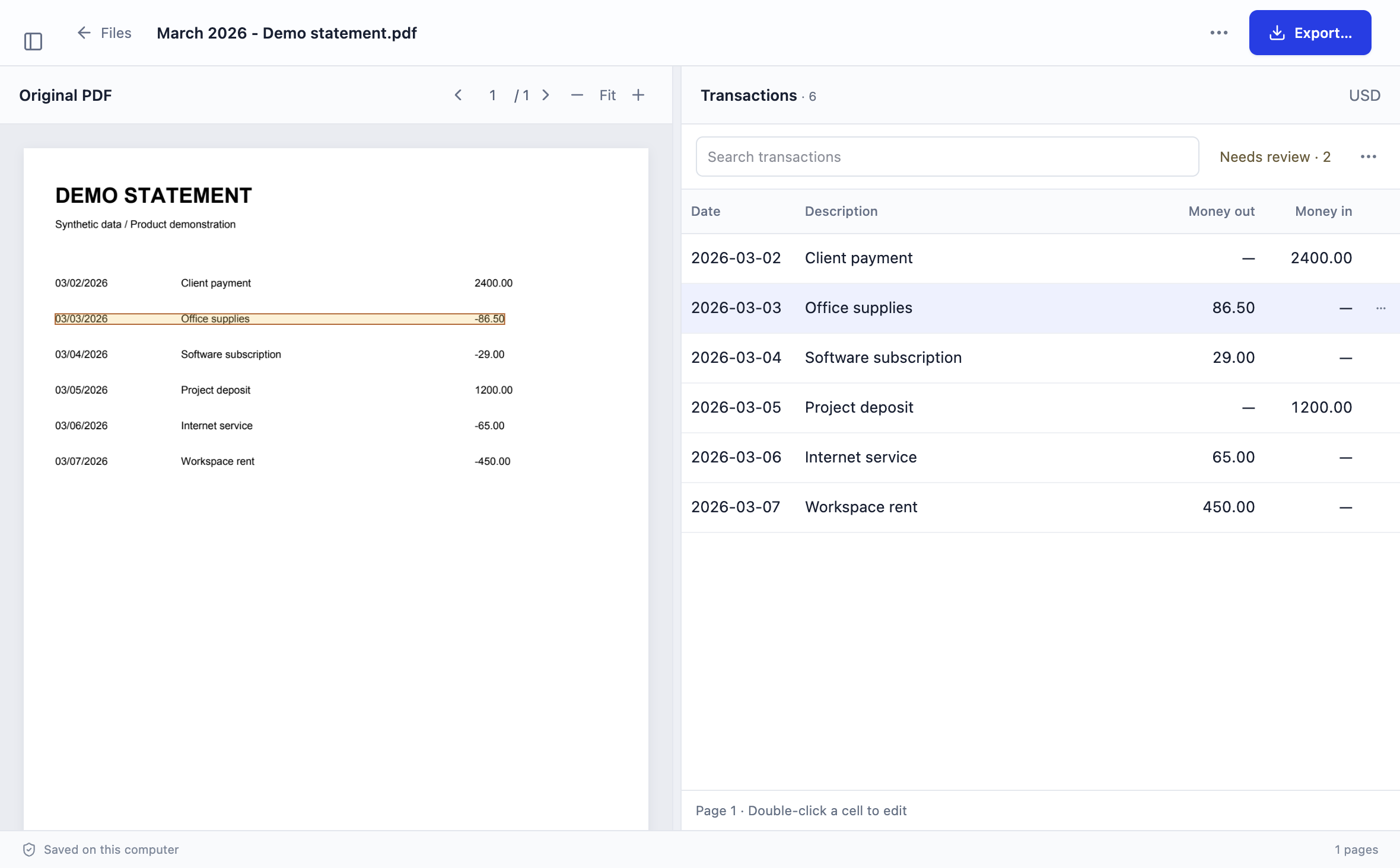
Actual Stmtio 0.1.0 interface · synthetic demo statement
WHAT IT DOES
Add digital or scanned statements, select pages, arrange a batch, and enter passwords for protected documents. Read the password-protected bank statement guide for the known-password workflow and tested scope.
Stmtio reads statement pages on your computer. Built-in OCR handles scanned pages without uploading the document for conversion.
Compare dates, descriptions and amounts with the original PDF. Correct fields or map columns when a layout needs help.
Follow the PDF-to-CSV workflow or the PDF-to-Excel workflow. Always test the exported file in its destination system.
THE WORKFLOW
LOCAL BY DESIGN
An internet connection is required to sign in and confirm the page allowance before a new conversion starts. See the local processing data flow, the security and data-handling page, and the complete Privacy Policy.
REVIEW IS PART OF THE PROCESS
Bank statement layouts vary. OCR and automated extraction can omit rows, split descriptions or assign the wrong date or amount. Stmtio is designed to make those results easier to inspect—not to remove the need for review.
Evaluating alternatives? Use the bank statement converter comparison hub for dated sources and transparent workflow criteria. The Stmtio vs DocuClipper comparison covers local review, cloud workflows and accounting handoffs.
Working with client statements? See the bank statement workflow for bookkeepers for intake, batch review, a synthetic page workload and a traceable client handoff.
Before using an export, compare row counts, page boundaries, dates, amount signs and balances with the original statement. Follow the bank statement review checklist for a repeatable handoff. Stmtio does not claim error-free conversion or support for every bank layout.
COMMON QUESTIONS
No. Statement PDFs, extracted text and transaction data are processed and stored on your computer. Account, subscription, device and page-usage checks use online services.
Yes. Stmtio includes local OCR for scanned pages. OCR results can contain mistakes, so review the extracted transactions against the original statement before export.
Stmtio 0.1.0 is available for Windows x64 and macOS on Apple silicon or Intel. The current preview installers are unsigned and may show operating-system warnings.
No universal compatibility claim is made. Statement layouts vary, and some documents require manual column mapping or corrections. Review every result before using it for bookkeeping.
You can export CSV or XLSX. Stmtio also provides a three-column CSV option for QuickBooks-style import workflows.
AVAILABLE FOR WINDOWS AND MACOS
Choose the installer for Windows x64, Apple silicon or Intel Mac.
Download Stmtio ↗