BANK STATEMENT CONVERTER COMPARISONS

Compare the workflow before choosing the converter.

For bookkeepers and accountants, the useful question is what happens between the PDF and a usable ledger. Compare where the statement goes, how you check the rows and whether the export fits your destination.

By Stmtio Team · Source overview checked · Not an independent ranking

01 / PUBLISHED COMPARISONS

Read the scope behind each comparison.

Every article retains its own author, sources, limitations and last-check date. The overview below does not turn an older article into a newly tested review.

02 / SIX DECISION CRITERIA

Start with your document-handling rules.

A local workflow can suit a policy against uploading client statements. An online workflow can suit a team that approves uploads and wants a browser-based process. Neither is automatically safer or more accurate; inspect the relevant controls and output.

Stmtio 0.1.0 scope and questions to ask any alternative
Decision pointStmtio todayWhat to verify elsewhere
Where documents are processedStatement PDFs, extracted text and transactions are processed on your computer.Whether documents are uploaded, where data is retained, deletion rules and third-party processing.
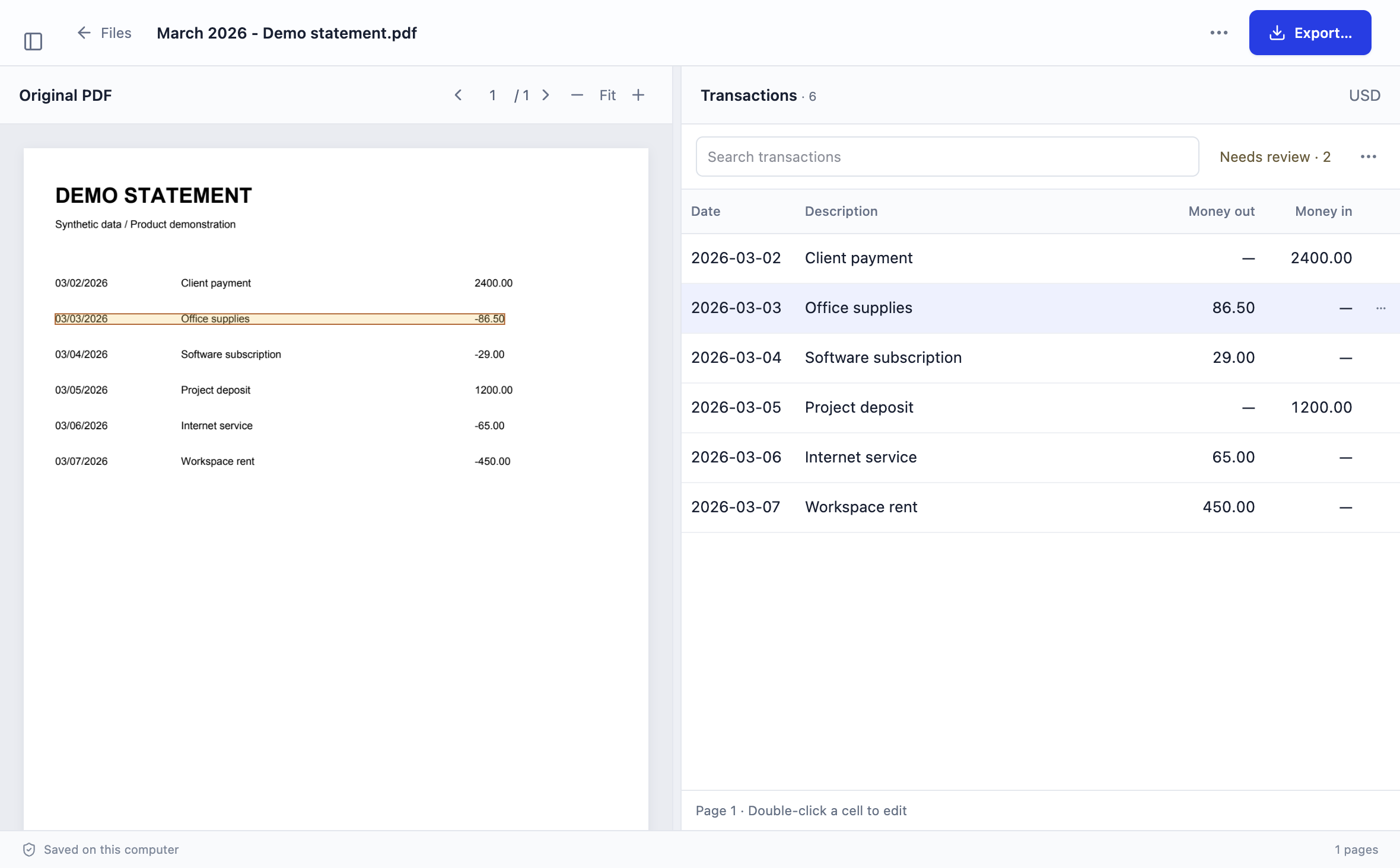
Review and correctionsCompare extracted transactions beside the source PDF; edit fields and use column mapping when needed.How to find missing rows, inspect an original page and correct dates, descriptions or signed amounts before export.
Export and destinationCSV and XLSX; a separate three-column QuickBooks Online CSV option. Current exports support USD.The actual file format, date order, currencies and mapping required by your exact bookkeeping software.
Scans and layoutsLocal OCR for scanned pages. Layouts may need manual mapping or correction.A representative scan, wrapped description and unfamiliar statement layout. Advertised coverage is not a test of your file.
Installation and connectivityWindows x64 and macOS Apple silicon or Intel. Sign-in, subscription and page-allowance checks require internet access.Supported environment, installation policy, connection requirements and account permissions.
Total effort and costReview time, page allowance and destination checks remain part of the workflow.Current prices, allowances, overages and time spent on review. Compare the whole task, not an assumed per-page saving.

Stmtio is an unsigned preview, not a guarantee of support for every bank layout. Review the release notes, data handling details and CSV vs Excel guide before evaluating an installer or handoff.

Stmtio review workspace showing extracted transactions beside a synthetic bank statement PDF
Actual Stmtio review workspace using synthetic demo data. Import a PDF, check the extracted rows beside the original, then export CSV/XLSX. This screenshot illustrates the workflow, not an accuracy benchmark.

03 / FIRST-PARTY SOURCE OVERVIEW

Provider statements, not hands-on scores.

The summaries here are limited to the linked providers’ public pages checked on October 14, 2026. We did not upload customer statements, buy competitor plans or verify their internal processing.

Bank Statement Converter

Its homepage advertises online PDF-to-Excel (XLS) conversion and anonymous or registered options. Its privacy policy states that uploaded documents remain on its servers for 24 hours before deletion.

Check your upload requirements and exact output format. The policy is a provider statement, not an independently tested retention guarantee.

DocuClipper

Its homepage advertises a document-upload workflow, bank statement exports including XLSX, CSV and QBO, and accounting integrations such as QuickBooks and Xero.

If integrations or additional document types matter to you, inspect the specific product and plan. We have not tested its integrations, output or accuracy for this hub.

AussieBankStatements

Its homepage describes uploading Australian bank statement PDFs and downloading CSV. Its Xero guide describes preparing transaction data for manual import and reconciliation.

Check the supported Australian bank layouts and destination format. Stmtio’s current USD export is a separate scope; this is not a claim that the products cover the same banks or currencies.

04 / METHOD & UPDATE POLICY

Separate documented facts from test results.

This hub is authored by the Stmtio Team and published by Calibre Digital, LLC. We make Stmtio, so these are vendor-authored comparisons rather than independent reviews.

We use current first-party product pages, documentation and policies for competitor statements. Claims remain attributed to their provider. When a feature has not been checked, we mark it unverified instead of treating it as absent.

We have not performed a same-document accuracy or speed benchmark across these products. We do not publish a “most accurate” winner, a security certification comparison or an assumed price-per-page ranking. An advertised bank list is not proof that your statement converts correctly.

Our editorial target is to recheck sources at least every 30 days and when a comparison changes materially. Each article keeps its own check date; the hub overview was checked on October 14, 2026. This is an editorial policy, not a claim that recurring rechecks have already happened. Always inspect the provider’s current terms before subscribing.

Use our statement review checklist for row counts, dates, signed amounts and balances. For QuickBooks, separately verify the CSV format and import preview. These checks are not an endorsement or affiliation with a bookkeeping platform.

COMMON QUESTIONS

Use the evidence within its limits.

Are these independent reviews?

No. This comparison hub and its articles are written by the Stmtio team. We identify first-party sources and distinguish published provider statements from behavior we have tested.

Is Stmtio more accurate than the alternatives?

We have not run a same-document accuracy or speed benchmark across these products. We do not claim that Stmtio is more accurate. Test representative statements and review dates, signs, row counts and balances.

Does “not verified” mean a feature is missing?

No. It means the stated comparison did not establish that behavior. Ask the provider or run an authorized test if that feature is important to your workflow.

How often are comparisons checked?

Our editorial target is to recheck first-party sources at least every 30 days and when materially revising a comparison. Each article shows its own check date. This hub’s source overview was checked October 14, 2026; that date does not replace older article dates.

TRY A REPRESENTATIVE STATEMENT

See whether a local review workflow fits.

Stmtio processes bank statement PDFs, extracted text and transactions on your computer. Compare rows beside the original PDF and export CSV/XLSX. Sign-in, subscription, device registration and page-allowance checks use online services.

Choose Windows x64 or macOS on Apple silicon or Intel. Keep the original PDF, check difficult rows and test your destination before processing a larger batch.

Choose your installer ↗

Explore the Stmtio workflow · Read the Blog