The short answer
Choose a statement converter around how you work—not just whether it produces a spreadsheet. Where the document is processed, how you check the result and whether the tool works on your computer all matter.
Consider Stmtio if you use Windows or macOS and want statement processing and transaction review on your computer. Its current preview combines local OCR, a PDF-side review workspace and CSV or XLSX export. You still need internet access to sign in and confirm your page allowance before a new conversion starts.
Consider Bank Statement Converter if you prefer an online service. Its website offers conversion without registration as well as registered and subscription options. That may suit an occasional task when you do not want to install Stmtio. Check its current limits before starting. Bank Statement Converter homepage
This comparison is written by the Stmtio team, not an independent review. We checked the linked competitor pages on September 17, 2026. We have not conducted a same-document accuracy or speed benchmark, and we do not claim that either product is more accurate.
How we checked this comparison
We reviewed Bank Statement Converter’s public homepage, subscription page and privacy policy on September 17, 2026. Those pages are the source for statements about its advertised workflow and document handling.
We did not upload a statement to the competitor, purchase a plan or test its output. The Stmtio workflow below uses the current 0.1.0 desktop preview and synthetic demo statements rather than customer data. Product details can change, so follow the linked provider pages for the latest terms.
At a glance
| Decision point | Stmtio 0.1.0 preview | Bank Statement Converter |
|---|---|---|
| Workflow | Installed desktop app | Online conversion service |
| Document handling | Statement PDFs, extracted text and transactions remain on your computer for processing | Its policy says uploaded documents stay on its servers for 24 hours, then are deleted; it says they are not forwarded to third parties |
| Getting started | Windows x64 or macOS (Apple silicon / Intel); sign-in and online page-allowance check | Homepage offers anonymous and registered conversion options |
| Review | Inspect and correct transactions beside the original PDF | An equivalent side-by-side correction workflow was not verified for this comparison |
| Exports | CSV and XLSX; test compatibility with your destination software | Homepage advertises Excel (XLS) output; verify the format required for your workflow |
| Scanned documents | Local OCR included in the current desktop preview | OCR behavior was not independently tested for this comparison |
| Pricing visibility | 10 free pages total; current monthly allowances are published on Stmtio’s pricing section | Homepage advertises anonymous and registered free options; subscription page shows monthly and annual plan categories, but we did not verify complete prices and allowances |
Competitor entries above are based on its public pages, not a hands-on benchmark. “Not verified” does not mean a feature is absent. Stmtio details reflect our bank statement converter page, current release and download information.
Where does your statement go?
Stmtio processes statement documents locally. That includes extracting transactions and recognizing scanned pages. Your PDFs and extracted transaction data are not uploaded to Stmtio for conversion. Account, subscription, device and page-usage information is handled online; local document processing is not the same as an entirely offline service. See our privacy policy.
Bank Statement Converter’s policy describes a different model: uploaded documents are retained on its servers for 24 hours before deletion, and it states that documents are not passed to third parties. Source: its privacy policy
That distinction does not establish that one product is secure and the other is unsafe. Decide whether uploading a client statement fits your organization’s rules. Local processing also leaves you responsible for your computer, disk access, backups and exported files. Neither a spreadsheet nor a downloaded PDF becomes protected simply because it is stored locally.
What reviewing a statement looks like in Stmtio
1. Import a small, representative document
Start with a statement similar to your normal workload. A clean digital PDF and a low-resolution scan can behave differently. If you use multiple banks, validate more than one layout before moving a full month of work into any converter.
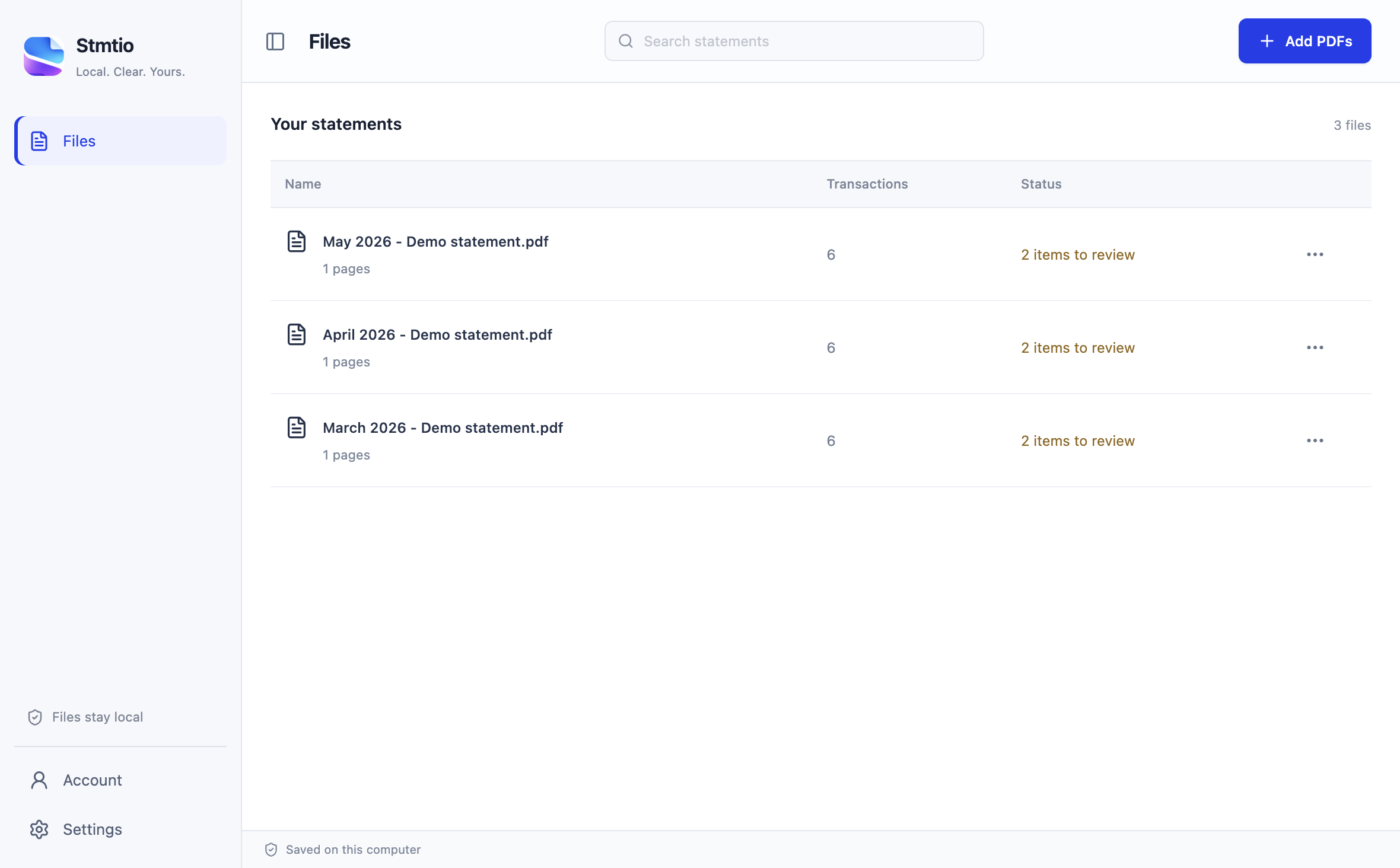
Actual Stmtio import queue using synthetic demo statements.
Stmtio requires a connection to sign in and reserve the page allowance for a new conversion. Once that reservation succeeds, processing can continue offline; usage syncs when you reconnect. Do not plan on starting a fresh conversion without connectivity.
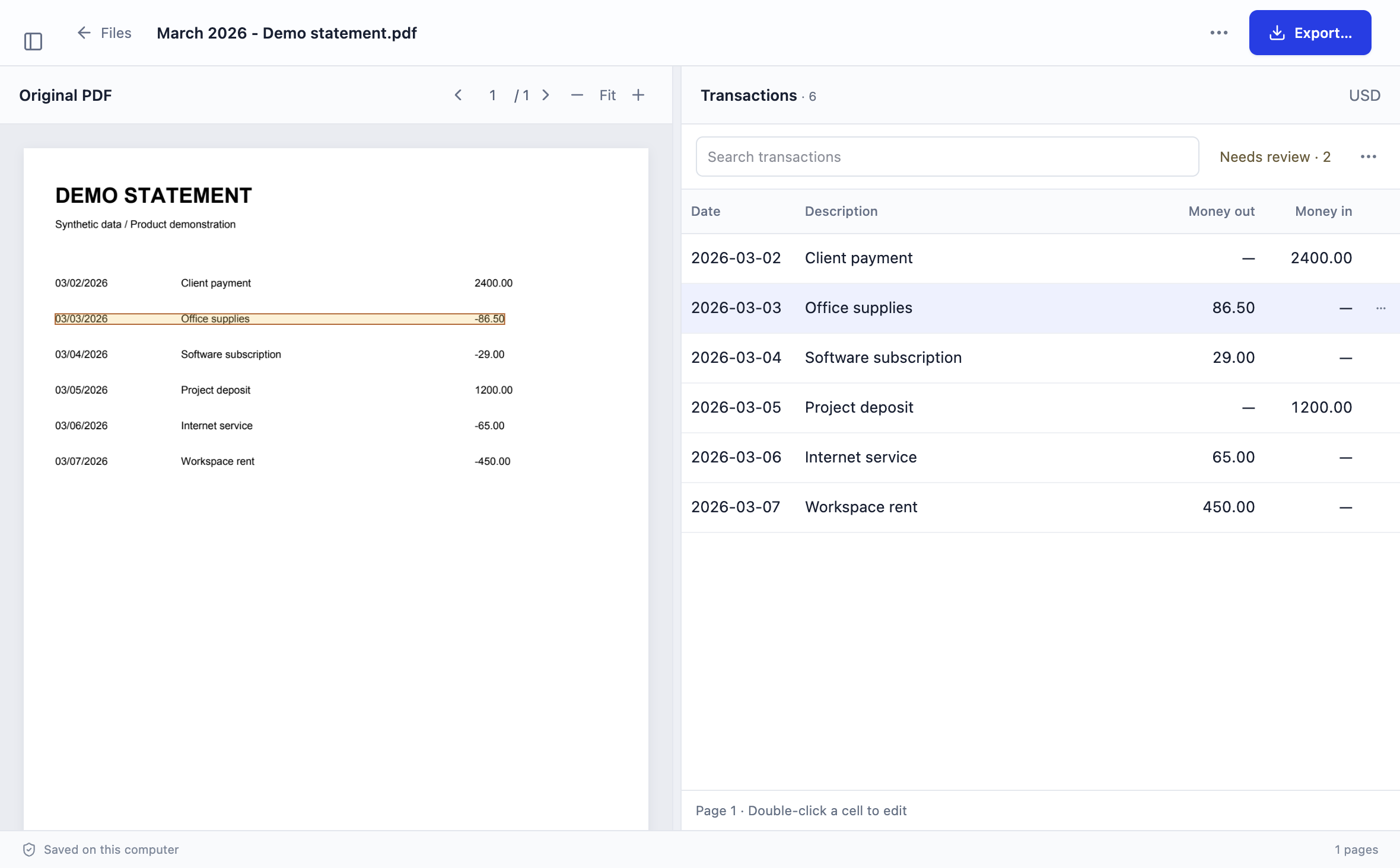
2. Check the extracted rows against the PDF
Use the review workspace shown above to compare dates, descriptions and amounts with the source statement. Correct fields and resolve flagged rows before exporting. Statement layouts vary, and some documents need manual mapping or correction; there is no promise that every bank layout works without intervention.
For scanned pages, the current desktop preview includes local OCR. Recognition is a starting point for review, not a substitute for it. Pay particular attention to decimal separators, negative amounts and faint characters.
If automatic column detection does not match a consistent statement layout, Stmtio lets you map the date, description and amount regions manually before reviewing the resulting rows.
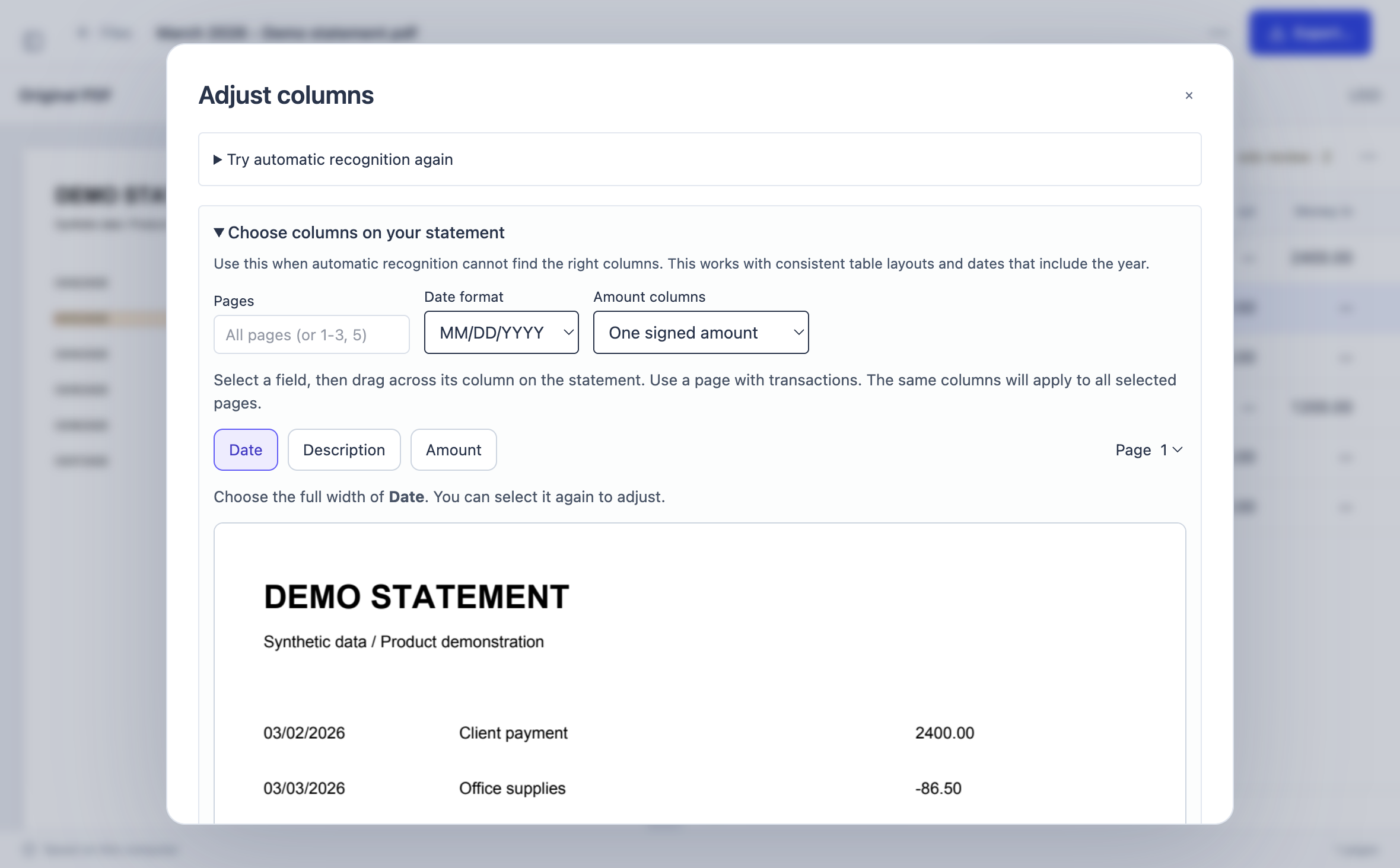
Actual Stmtio column-mapping interface using synthetic demo data.
3. Export for the software you actually use
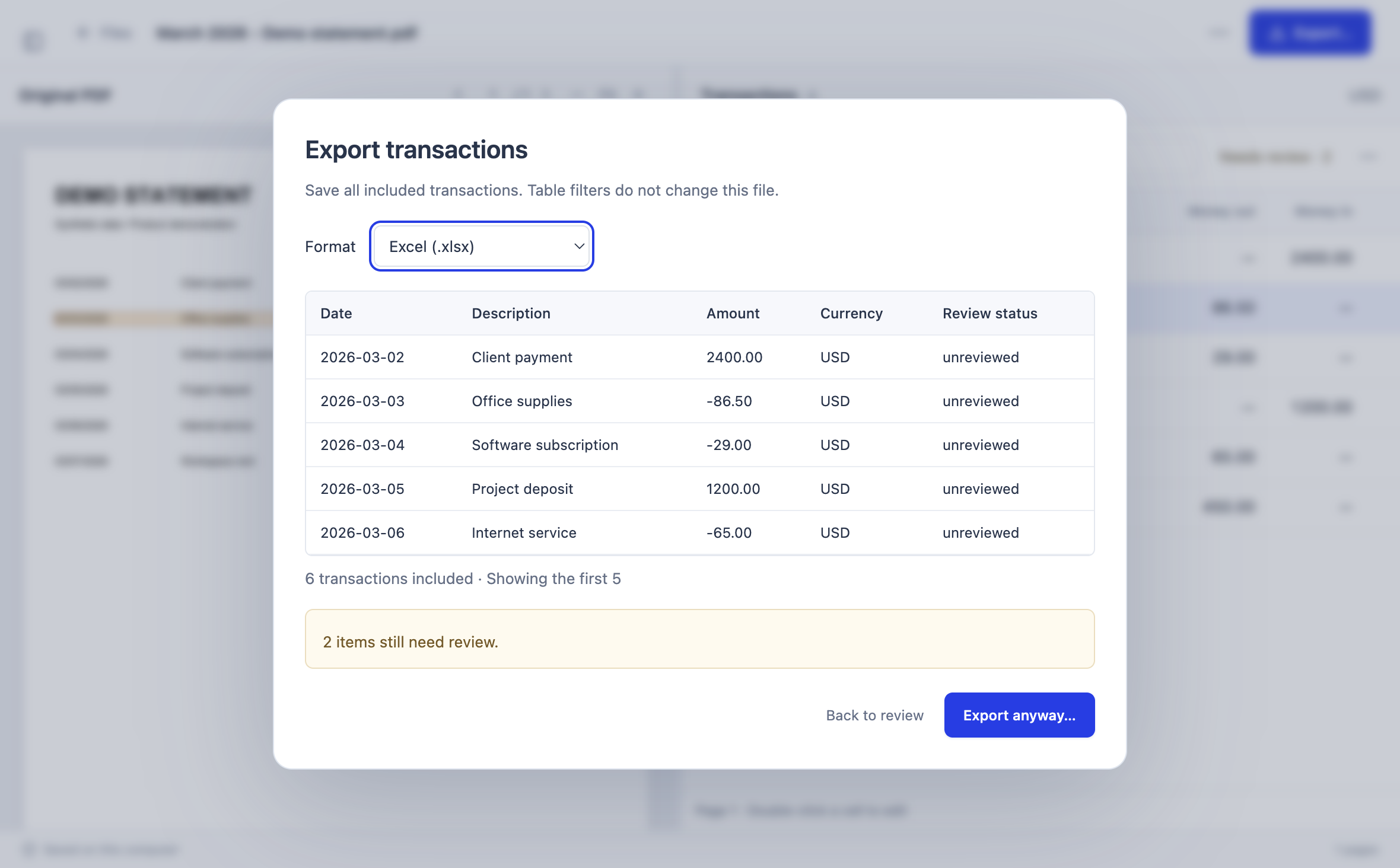
Actual Stmtio export interface using synthetic demo data.
Stmtio exports CSV and XLSX, including a three-column CSV option for QuickBooks-style workflows. The bank statement PDF to CSV guide explains encoding, signed amounts and column mapping, while the bank statement PDF to Excel guide covers XLSX fields and pre-export checks. A format option is not a guarantee that every edition or import configuration of your bookkeeping software will accept it unchanged. Test a small import, check the column mapping and confirm debit/credit signs before importing the rest.
Compare the total effort, not just the price
Stmtio currently includes 10 free pages in total. Solo is US$19 per month for 800 pages and Studio is US$49 per month for 6,000 pages. These are the published monthly allowances as of the date above; check our pricing section before subscribing.
We are not publishing a competitor price ranking here. Its public homepage advertises free and subscription options, and its subscription page presents monthly and annual plan categories. We did not verify a complete current price-and-allowance schedule, so consult the provider directly rather than relying on a guessed per-page figure. Bank Statement Converter subscriptions
For your own trial, note the time spent correcting rows, splitting files and fixing an import. A low conversion price is less useful if the output still needs substantial cleanup. Conversely, an online conversion may be enough for a simple, occasional task. Test your actual documents rather than treating either conclusion as universal.
Current limitations to know before downloading
Stmtio 0.1.0 is available as an unsigned desktop preview for Windows x64 and macOS on Apple silicon or Intel. Choose the matching installer on the download page.
The macOS preview is not yet Developer ID signed or notarized. Windows installers are also unsigned and may trigger SmartScreen warnings. Consider whether preview software fits your organization’s installation policy before downloading. Read the release notes and getting-started instructions.
We have not independently verified the competitor’s OCR performance, review features or browser/device compatibility. If one of these is essential to you, test it or ask the provider before committing to a subscription.
A five-minute validation checklist
Before relying on either tool’s output:
- Count the transactions. Look for missing rows, duplicate entries and page-boundary errors. Distinguish transactions from opening balances and summary totals.
- Check dates and signs. Confirm the date convention and whether payments, withdrawals and refunds have the expected direction.
- Compare the numbers. Reconcile opening and closing balances with movements where the statement makes this possible. Investigate differences rather than silently adjusting a figure.
- Inspect a difficult page. Include a scan, a wrapped description or an unusual layout if these occur in your usual work.
- Test the destination. Import a small sample into your bookkeeping workflow and check it before proceeding with the full file.
The right choice is the tool that fits your document-handling requirements and produces results you can verify with a manageable amount of work. If local processing and source-side review are your priorities—and you have a compatible Windows PC or Mac—try Stmtio on one representative statement first.
Sources and comparison scope
- Bank Statement Converter homepage: online offering, anonymous/registered options and advertised export format. Checked September 17, 2026.
- Bank Statement Converter subscription page: monthly and annual plan categories. Checked September 17, 2026.
- Bank Statement Converter privacy policy: document retention and third-party handling statements. Checked September 17, 2026.
- Stmtio bank statement converter and pricing: current published workflow, platforms and allowances.
- Stmtio release notes and privacy policy: preview limitations and local/online data boundaries.
Product details can change. This article compares documented workflows, not measured conversion accuracy, independent security certifications or a complete feature inventory.
TRY YOUR OWN WORKFLOW
Start with one statement.
Use your 10 free pages to check the fit. Review your transactions before relying on an export.
Download Stmtio ↗