
BANK STATEMENT REVIEW GUIDE
Bank statement review checklist before export.
Before you use a converted bank statement, compare its transactions with the original PDF page by page. Check row counts, page boundaries, dates, signed amounts, duplicates and balances when available. Then test a small CSV or Excel import. This printable checklist gives bookkeepers a repeatable way to catch errors that a plausible-looking spreadsheet can hide.
For digital and scanned statements · Updated September 25, 2026
EIGHT CHECKS BEFORE HANDOFF
Work from the PDF outward.
Use one copy for each statement. Mark a check only after you have compared the export with the source, not merely scanned the output table.
Unresolved differences / unavailable checks:
SYNTHETIC WORKED EXAMPLE
A duplicate row can hide in a tidy export.
These figures are invented for illustration. They are not a real customer's statement or a Stmtio accuracy result.
| PDF page | Date | Description | Signed amount |
|---|---|---|---|
| 1 | 2026-03-02 | Client payment | +$2,400.00 |
| 1 | 2026-03-03 | Office supplies | −$86.50 |
| 2 | 2026-03-04 | Software subscription | −$29.00 |
| 2 | 2026-03-05 | Project deposit | +$1,200.00 |
If “Office supplies” is copied a second time at the page boundary, the draft has 5 rows and implies $4,398.00—$86.50 below the source closing balance. Check the PDF before excluding a row: repeated descriptions or amounts can also be legitimate.
REVIEW BESIDE THE SOURCE
Keep the original page in view.
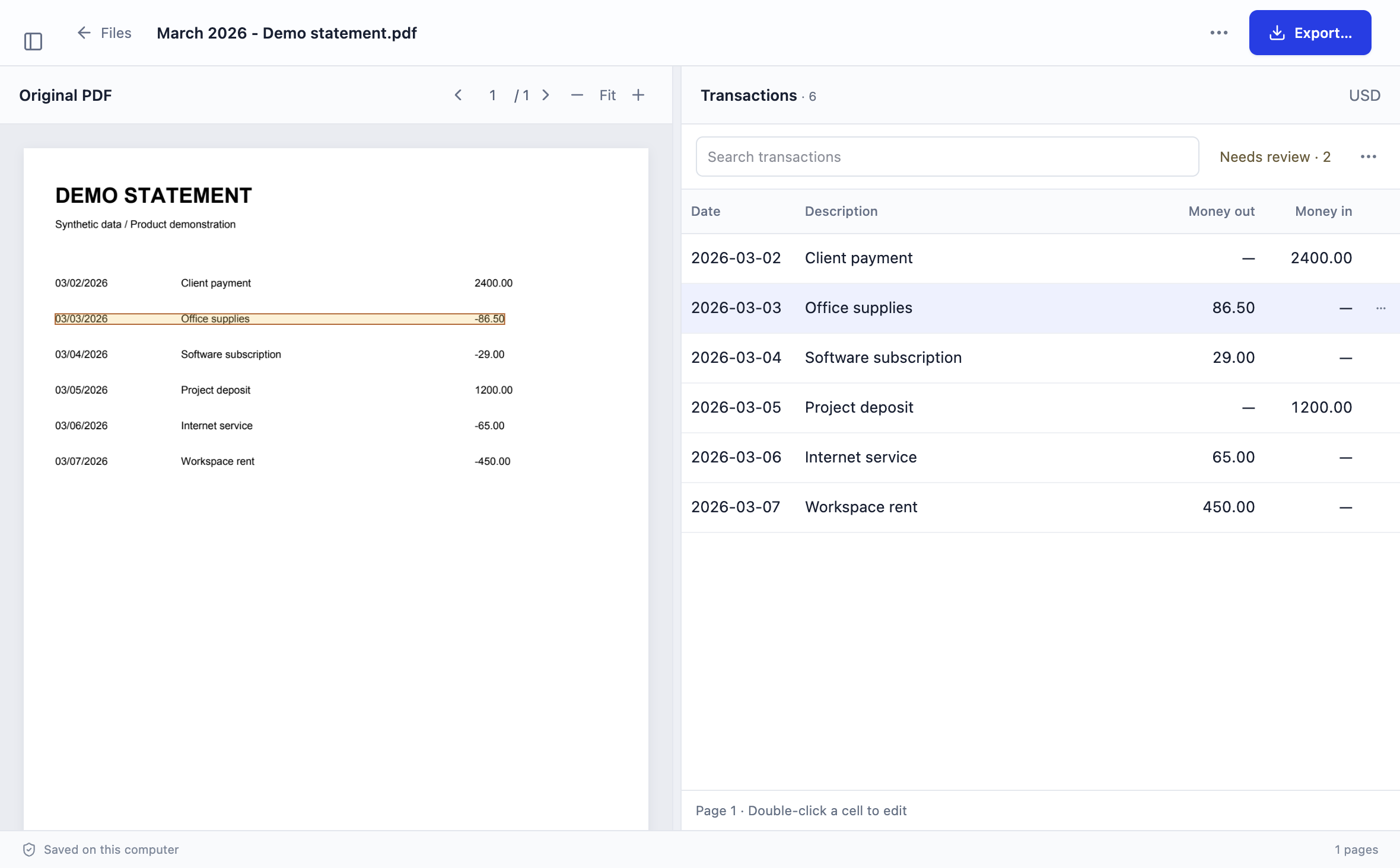
Stmtio places extracted transactions next to the original statement PDF. Review a row in context, correct fields that need attention, and check page boundaries before you export. Its local OCR can read scanned pages, but OCR and extraction still require your review.
The statement PDF, extracted text and transaction data are processed and stored on your computer. Sign-in, subscription, device registration and page-allowance checks need an internet connection. Stmtio 0.1.0 is available for Windows x64 and macOS on Apple silicon or Intel.
Explore the bank statement converter and scanned PDF OCR workflow.
AFTER THE REVIEW
Choose an export for the next step.
COMMON QUESTIONS
A few review decisions.
Is a matching row count enough?
No. A missing row and a duplicate row can cancel each other in the count. Check page boundaries, transaction details and balances where the statement provides them.
What if the statement has no opening or closing balance?
Do not invent one. Complete the page-by-page, field and duplicate checks, then record balance reconciliation as unavailable for that statement.
Can I skip review for a digital PDF?
No. Text-based PDFs avoid some OCR errors, but transaction extraction can still split descriptions, miss rows or map amounts incorrectly.
TRY THE REVIEW WORKFLOW
Start with one representative statement.
Download the unsigned Stmtio 0.1.0 preview for Windows x64, Apple silicon or Intel Mac. The first 10 pages are free; review every result before you use it for bookkeeping.
Choose your installer ↗