
CONVERSION REVIEW AND RECONCILIATION
Reconcile converted bank statements. Trace every difference.
Compare converted transactions with the same account, period and all source PDF pages. Verify record counts, page boundaries, dates, descriptions and signed amounts. Where the statement prints opening and closing balances, compare its closing balance with opening balance plus converted transactions. Investigate differences before export or import. A matching count or zero difference does not replace checking individual records.
By Stmtio Team · Checked October 27, 2026 · Manual checks, not a completed ledger reconciliation
FIVE-MINUTE FIRST PASS
Check scope before chasing totals.
Use these five checks to triage a conversion. Five minutes is a suggested first pass, not a completion-time promise: a long or inconsistent statement needs more review. This page does not save or submit your ticks.
For the full page-by-page process, use the bank statement review checklist. For a split description, inspect its source line before using the description repair steps.
SYNTHETIC TWO-PAGE STATEMENT
Five records in each list. Two errors in the draft.
This invented March 2026 USD bank-account example has an opening balance of $1,000.00 and a printed closing balance of $4,459.50. Its five actual transactions are shown below. No customer data or bank-support claim is involved.
| PDF page | Date / description | Source signed amount | Draft occurrence |
|---|---|---|---|
| Page 1 | 2026-03-02Client payment | $2,400.00 | Once |
| Page 1 | 2026-03-03Office supplies | -$86.50 | Twice — inspect the duplicate |
| Page 2 | 2026-03-04Software subscription | -$29.00 | Missing |
| Page 2 | 2026-03-05Project deposit | $1,200.00 | Once |
| Page 2 | 2026-03-06Monthly account fee | -$25.00 | Once |
The draft repeats Office supplies -86.50 and omits Software subscription -29.00 at the start of page 2. It still has five records. Only comparison with the source identifies which occurrence is extra and which transaction is missing.
- Draft signed total
- $3,402.00
- Draft calculated closing
- $4,402.00
- Unexplained difference
- $57.50
Use an independent closing balance.
Calculated closing = opening balance + sum of signed transactions
Difference = statement closing − calculated closing
For the draft: $1,000.00 + $3,402.00 = $4,402.00; $4,459.50 − $4,402.00 = $57.50. The printed source closing balance is a separate control, not a total reconstructed from the same draft.
After source review, remove the duplicate occurrence and restore the missing record. The signed total becomes $3,459.50, the calculated closing is $4,459.50, and the difference is $0.00. Dates, descriptions and row identities still need review.
Companion workbook with an independent Statement sheet, faulty draft, static reviewed reference and editable reconciliation formulas. It is an educational example, not a native Stmtio export or automatic repair tool. The file download is not tracked as an installer conversion.
INVESTIGATE, DO NOT PLUG THE GAP
A difference is a clue, not an instruction to add a row.
Missing or repeated records
Check the selected pages, unresolved rows and page transitions. Verify suspected duplicates against the PDF: two equal payments can be legitimate. Do not remove a source transaction merely because its amount repeats. Where extraction missed a row, revisit page selection or column mapping and re-extract as needed.
Wrong sign or decimal
Compare money in and money out, not just column labels. Reversing -86.50 to +86.50 changes the total by 173.00. Use the debit, credit and signed-amount guide for refunds, transfers and source-account conventions.
Wrong account, period or control
Confirm that opening balance, closing balance and transactions belong to the same account and period. Keep accounts and currencies separate. Do not use an available-balance figure, a running subtotal or a balance from another statement as the closing control without verifying its meaning.
Missing balances or a zero difference
If the source omits a required balance, record the check as unavailable. Do not invent a control. If the difference is zero, continue checking transaction fields: offsetting errors can cancel, while a wrong date or description can leave the total unchanged. Do not add a made-up balancing transaction.
REVIEW IN STMTIO
Keep the source beside the transaction.
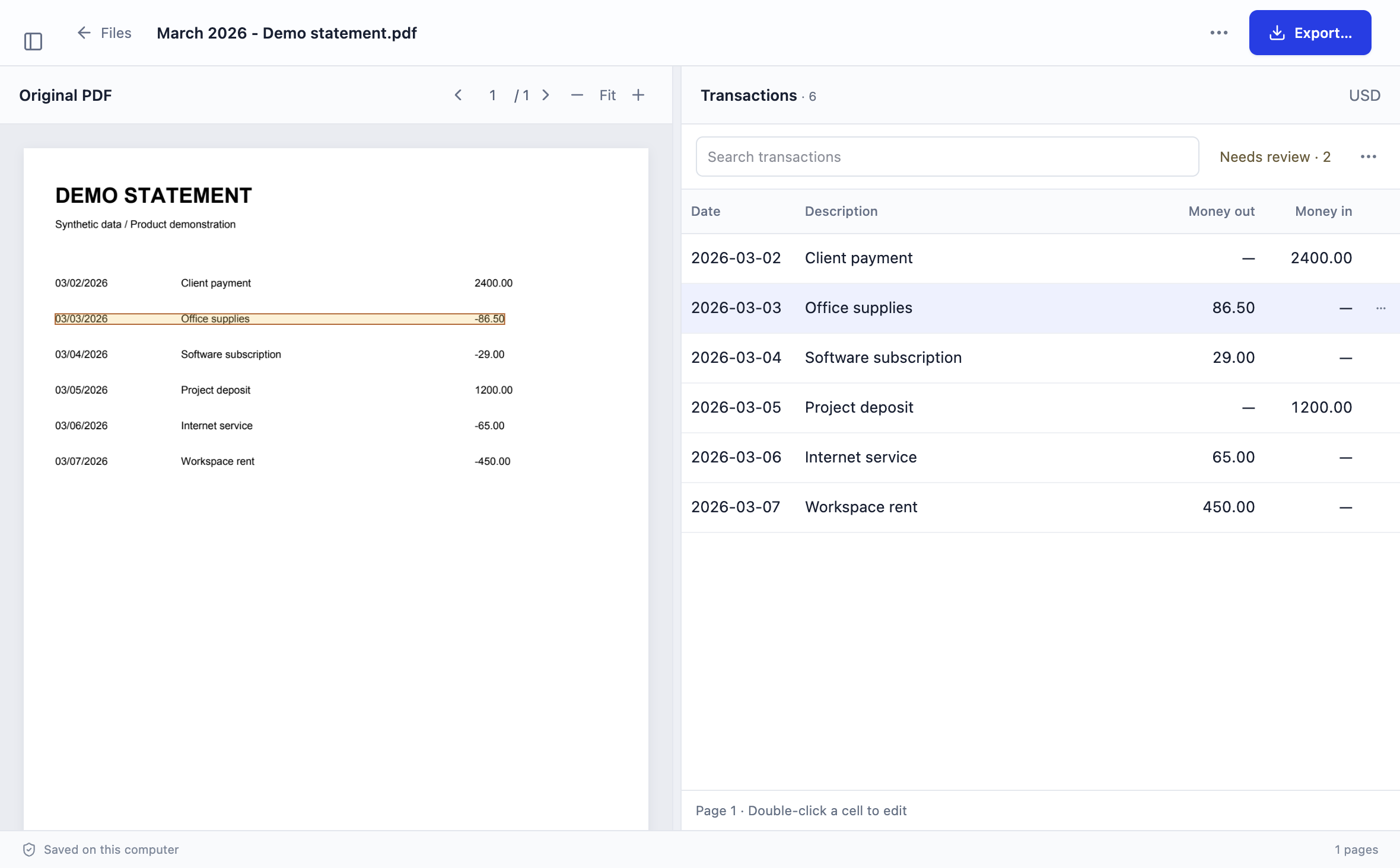
Stmtio lets you review and edit extracted dates, descriptions and amounts beside the original PDF. Check a suspected repeat before using Exclude from export; use Adjust columns if the source fields are mapped incorrectly.
Excluded rows are omitted from CSV/XLSX, but unreviewed rows are not automatically excluded. Reopen the saved file and check the exported record set. The manual controls on this page do not claim that Stmtio automatically checks closing balances or certifies the result.
For file types and representations, see the CSV versus Excel guide.
CHECK THE NEXT SYSTEM SEPARATELY
A faithful statement export is not a reconciled ledger.
Before importing, confirm the destination account, date format, amount convention and existing transactions. Inspect a small representative preview; avoid importing records that are already present. Use the QuickBooks CSV upload guide for that destination.
Ledger reconciliation can include posting dates and uncleared items beyond this conversion check. Intuit’s reconciliation troubleshooting guide describes comparing specific transactions and verifying source balances. Do not change correctly extracted statement records just to make a ledger balance agree. Investigate that destination’s discrepancy separately.
These examples were not imported into a real QuickBooks account. They do not establish compatibility with every bank layout, account type or accounting system.
COMMON QUESTIONS
What the controls can and cannot prove.
Is the same transaction count enough?
No. In the synthetic example, both lists contain five records, but the draft duplicates the office-supplies payment and omits the software subscription. Compare record identities and page boundaries as well as counts.
Does a zero difference prove the conversion is accurate?
No. Two offsetting amount errors can cancel, and incorrect dates or descriptions may leave the balance unchanged. A zero difference is one control, not a replacement for transaction-level review.
What if the PDF has no opening or closing balance?
Do not invent a balance or use a balance calculated from the same extracted rows as an independent source. Mark the balance check unavailable and complete the scope, row, field and handoff checks.
Does Stmtio automatically complete this reconciliation?
This guide describes manual conversion checks, not an automatic reconciliation feature. Stmtio supports reviewing transactions beside the PDF and exporting CSV or XLSX. Unreviewed rows are not automatically excluded from export.
Is this the same as reconciling my accounting ledger?
No. First check whether the converted records faithfully represent the statement. Ledger reconciliation is a separate process that can involve account selection, posting dates, uncleared items and existing transactions in the destination.
Checked by Stmtio Team on October 27, 2026 against the current review interface and CSV/XLSX export code, the synthetic workbook calculations, and Intuit’s first-party reconciliation guidance. Synthetic examples illustrate manual controls, not measured extraction accuracy or a completed accounting reconciliation.
LOCAL EXTRACTION, MANUAL REVIEW
Review one representative statement first.
Stmtio processes and stores statement PDFs, extracted text and transactions on your computer. Sign-in, subscription, device registration and page-allowance checks require online services. Sending an export to another service is a separate action. Read the data-handling boundaries.
Available for Windows x64 and macOS on Apple silicon and Intel. Stmtio 0.1.0 Preview supports USD exports and has unsigned installers. Start with 10 free pages; review before bookkeeping use.
Choose your installer ↗