LOCAL BANK STATEMENT CONVERTER

Process bank statements on your computer. Know what goes online.

Stmtio reads bank statement PDFs, extracts transactions and lets you review them beside the original document on Windows or Mac. Your statement content stays on your computer. Sign-in, subscription and page-allowance checks need an internet connection.

Windows x64 · Apple silicon and Intel Mac · CSV and XLSX export

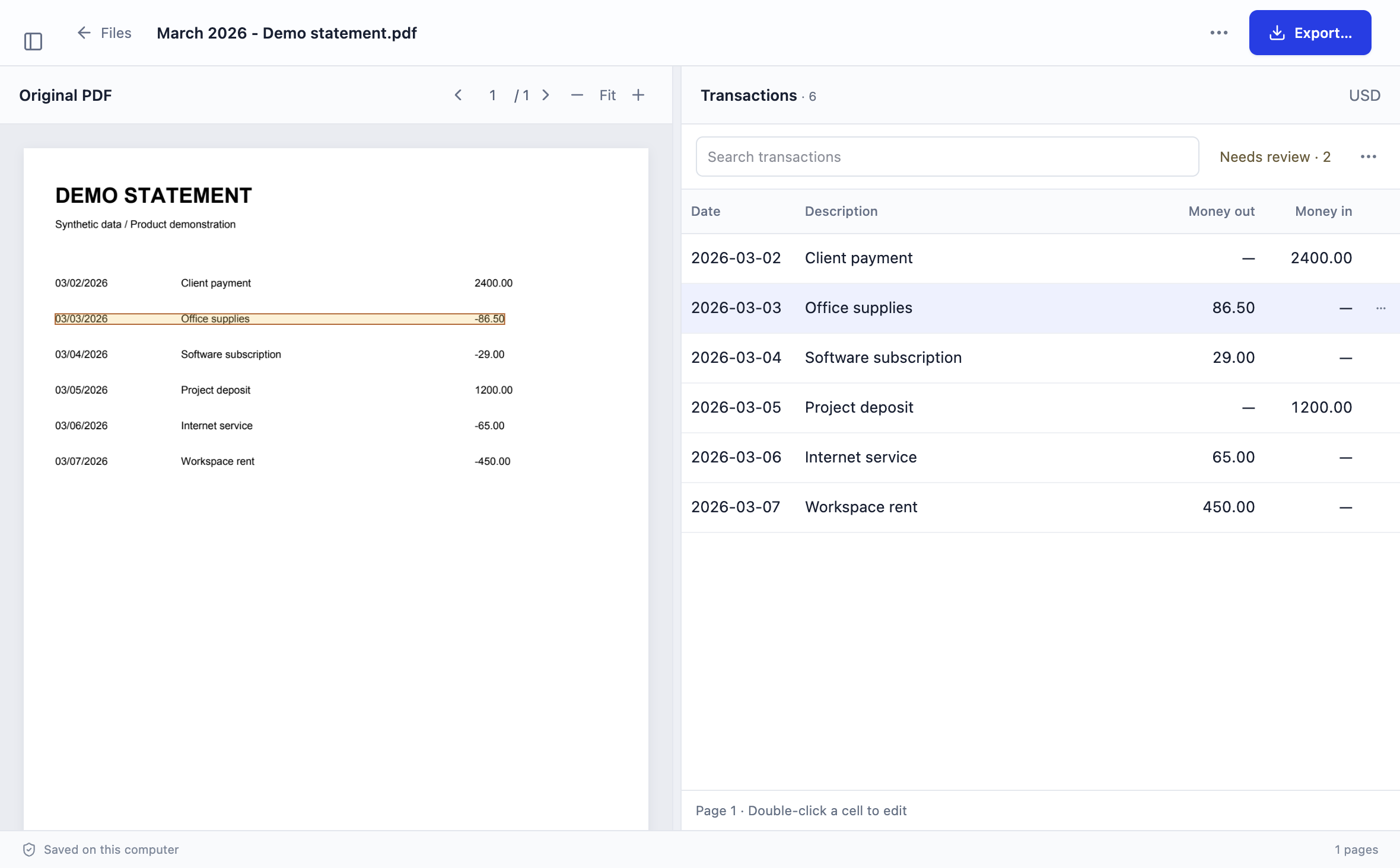
Stmtio review workspace with extracted transactions beside a synthetic bank statement
Actual Stmtio 0.1.0 review interface · synthetic demo statement

WHERE YOUR DATA GOES

Two paths. Different information.

Local conversion does not mean the whole app is disconnected. Document content follows the on-device path; account and allowance checks follow the online path.

ON YOUR COMPUTER

Statement content

  1. Import a PDF from your computer
  2. Read text or run OCR locally
  3. Review and correct extracted transactions
  4. Export CSV or Excel XLSX locally

Statement PDFs, extracted text and transaction data are not uploaded to Stmtio for conversion.

ONLINE SERVICE

Account and allowance

  1. Sign in to your account
  2. Check subscription and registered device
  3. Confirm page allowance before conversion
  4. Sync page usage when connected

These requests support access and usage management; they are not a statement-upload step.

LOCAL IS NOT FULLY OFFLINE

Start connected. Process locally.

Stmtio needs an internet connection to sign in and confirm your page allowance before starting a new conversion. Processing can then continue offline. Saved documents remain on your computer, and page usage syncs when you reconnect.

Online services handle account details, authentication sessions, registered device information, subscription status and page-usage records. For the full description, read the Privacy Policy. The bank statement converter overview covers the complete import-to-export workflow.

YOUR STORAGE, YOUR CONTROL

Local files still need protection.

Processing on your computer does not automatically encrypt local files, exports or backups. Protect your device and storage, and check whether a cloud-synced folder may copy them through its own provider.

Before sharing an export

Compare dates, descriptions, amount signs and missing rows with the original PDF. Use the review checklist, especially for scanned statements that need OCR. Local processing does not guarantee perfect extraction or support for every bank layout.

AFTER REVIEW

Export a file you can inspect.

Save checked transactions as CSV or Excel XLSX. The source statement and resulting files remain in your local workspace until you decide where to store or share them.

The 0.1.0 preview is available for Windows x64 and macOS on Apple silicon or Intel. Current installers are unsigned and may show operating-system warnings.

COMMON QUESTIONS

What “local” means in practice.

Does local processing mean Stmtio is fully offline?

No. An internet connection is needed to sign in and confirm the page allowance before a new conversion starts. Processing can then continue offline, and page usage syncs when you reconnect.

Are my bank statement pages uploaded for OCR?

No. Statement PDFs, OCR text and extracted transactions are processed and stored on your computer. Stmtio does not upload statement contents to its servers for conversion.

What information is handled online?

Online services handle account and sign-in information, registered device information, subscription status and page-usage checks. The Privacy Policy explains these categories in more detail.

Are local files automatically encrypted?

No. Local processing does not automatically encrypt your workspace, exports or backups. Protect your device and storage, and be aware that a cloud-synced folder may upload files through its own provider.

Can I use the converted data without checking it?

You should review dates, descriptions, amounts and missing rows beside the original PDF before export. OCR and extraction can make mistakes on some statements.

TRY ONE REPRESENTATIVE STATEMENT

Keep the document local. Review the result.

Choose the installer for your computer. The first 10 pages are free; check the output against the source before using it for bookkeeping.

Choose your installer ↗