
CHOOSE THE DATA PATH AND WORKFLOW
Desktop vs online bank statement converters. Follow the document, then choose.
Compare where a bank statement PDF is processed, which steps need the internet, how long each copy is kept and who reviews the result. Stmtio processes statement contents on your computer and connects for account and page-allowance checks. An upload-based service adds a provider-side document path. Choose against your actual device, data-handling and collaboration requirements, then test the review and export workflow.
By Stmtio Team · Checked November 9, 2026 · We build Stmtio; provider statements are attributed below
01 / DOCUMENTS AND ACCOUNTS TAKE DIFFERENT PATHS
Installation is a clue. The data flow is the evidence.
Desktop and online describe how you access a tool. Establish the processing location separately. A desktop application can depend on online services; a browser interface alone does not tell you whether a particular service processes a file locally or uploads it.
Stmtio statement contents
- PDF on your computer
- Local extraction and OCR
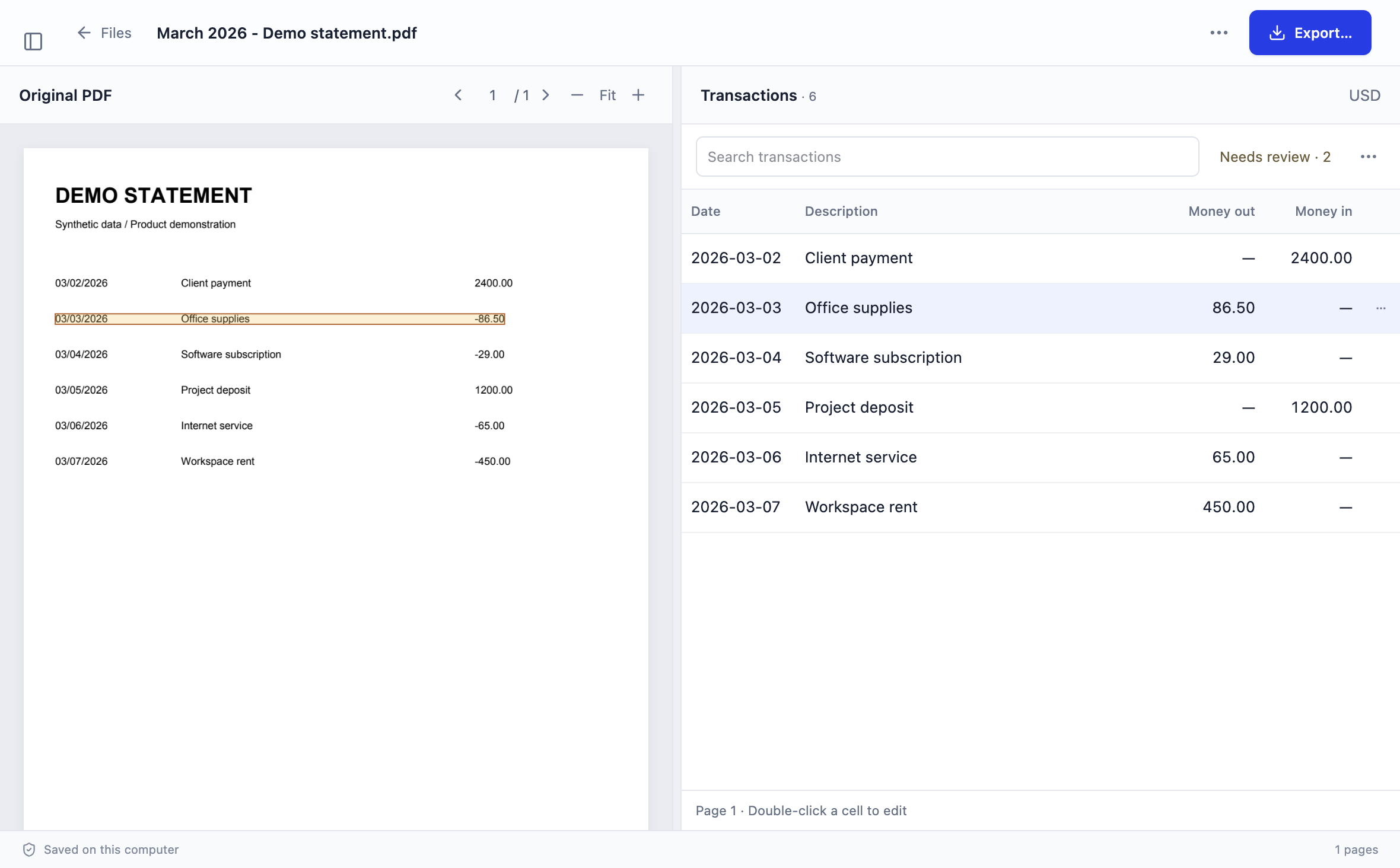
- Review beside the PDF
- Local CSV/XLSX export
PDFs, extracted text and transactions stay on your computer for conversion and review.
Stmtio account services
- Desktop account checks
- Online identity, subscription, device and page-usage services
A new conversion needs these online checks. This account path is separate from the statement-content path.
An upload-based online workflow
- PDF on your computer
- Upload to the provider
- Provider processing
- Download and review the export
Illustrative service pattern. Verify the actual provider’s processing, review and retention rules.
02 / SEVEN WORKFLOW DECISIONS
Compare the conditions you will actually work under.
The second column describes Stmtio 0.1.0. The third is a set of questions for an online candidate, not a claim that every service has the same capabilities or risks.
| Decision | Stmtio desktop workflow | Check an online candidate |
|---|---|---|
| Installation | Install Stmtio on Windows x64 or macOS on Apple silicon or Intel. The 0.1.0 Preview installers are unsigned. | Check supported browsers, any required extensions or local components, and whether your device policy allows the workflow. |
| Statement processing | PDFs, extracted text and transactions are processed and stored on your computer, not uploaded to Stmtio for conversion. | Establish whether the original PDF, OCR text or transactions leave the device, who processes them and where. A browser interface alone does not answer that question. |
| Internet connection | Sign-in, subscription, device registration and page-allowance checks use online services. Starting a new conversion requires a connection. | Check which upload, processing, review, export and account steps need a live service connection. Do not assume an installed app is fully offline either. |
| Retention and deletion | Manage local originals, workspace files, exports and backups. Online account and billing records have separate purposes and retention boundaries. | Check separate policies for uploaded documents, extracted data, backups and account records. Confirm what manual deletion, cancellation and account type change. |
| Review and output | Compare transactions beside the PDF, correct fields and export CSV/XLSX. Current transaction exports support USD. | Try representative, authorized statements. Check source review, editable fields, page coverage, amount signs and the exact export needed by the receiving system. |
| Collaboration | Share reviewed exports through your chosen handoff process. Keep client/account scope, permissions and exceptions explicit. | If shared review is required, verify actual roles, access per client, edit history, export rights and plan restrictions. Do not infer those features from the word cloud. |
| Operational responsibility | Protect the device, storage, updates, access permissions and backups. Local processing does not automatically encrypt these files. | Review both your own device/download controls and the provider’s documented processing, access, retention and service dependencies. |
Review the Stmtio data-handling map and Privacy Policy for account-data and local-file boundaries. A local workspace still needs device and backup controls; a provider’s security statement still needs to fit your permitted use.
03 / EXAMPLE REQUIREMENTS
Let the requirement narrow the shortlist.
These are hypothetical selection scenarios, not customer case studies or measured product results.
“Statement contents must stay on an approved computer.”
Consider a verified local-processing workflow such as Stmtio if installing the app and its online account checks are allowed. Review device access, storage, backups and any synced folders. This does not by itself establish that the workflow meets a legal obligation or your firm’s policy.
“Several people need shared review and access history.”
Evaluate a service whose current documentation and plan explicitly support the needed roles and review process. Verify who can read, edit, export or delete each client’s records and whether document retention is acceptable. For Stmtio, arrange your own reviewed-file handoff; do not assume automatic shared cloud review.
“The entire workflow must have no network access.”
Stmtio’s online sign-in and conversion-start checks do not meet a fully air-gapped requirement. Clarify the exact offline requirement before choosing an installed app. An online tool should not be assumed to work without its service connection either.
04 / TEST THE RESULT IN EITHER WORKFLOW
Processing location does not establish accuracy.
Use representative, authorized files. Check scanned and text-based pages as applicable, dates, descriptions, amount signs, transaction counts, page boundaries and balances. Review the exported file in the intended destination before relying on it.
Stmtio supports source-side review and corrections with CSV/XLSX export. Excluded rows are omitted, but unreviewed rows are not automatically excluded; table filters do not restrict the saved file. The current standard export has Date, Description, Amount, Currency and Review status. Current transaction exports support USD.
Use the review checklist, conversion controls and CSV versus Excel guide. No same-document accuracy, speed or collaboration benchmark was run for this guide.
05 / CURRENT FIRST-PARTY EXAMPLES
Retention differs between providers and account types.
Checked November 9, 2026. The statements below are attributed provider policies, not independently verified deletion results. They illustrate why a single “online retention period” would be misleading.
Bank Statement Converter
Its Privacy Policy says uploaded documents remain on its servers for 24 hours before deletion. Confirm the treatment of extracted outputs, account information and any other copies relevant to your requirements; do not extend this document policy to every data category.
DocuClipper
Its security and retention page lists different schedules: ongoing subscribers retain data, cancellation starts a 90-day interval, and trial/free uploads have a roughly 30-day period. Check how these stated rules apply to your account and the data categories you need covered.
These are two specific examples, not an inventory of all online tools. We did not inspect private security reports, test deletion timing, verify backup removal or run a comparative extraction benchmark. Ask the provider for clarification where its public wording does not answer your requirement.
For product-specific, vendor-authored comparisons, use the comparison hub. Its linked articles retain their own check dates; this guide does not silently update their conclusions.
COMMON QUESTIONS
Check the path, the controls and the output.
Is a desktop converter always local and offline?
No. Installation does not establish where document processing happens or which services need a connection. Stmtio processes statement contents locally, but account and page-allowance checks require online services before a new conversion.
Does every browser-based converter upload the statement?
A browser interface alone does not prove the processing location. Check the specific service’s data-flow and privacy documentation. The online lane in this guide illustrates an upload-based service, not every possible browser application.
Is local processing automatically more accurate?
No accuracy conclusion follows from the processing location. Compare representative files, check each result against the original and inspect the saved export. This guide does not present a same-document accuracy or speed benchmark.
Does deleting a cloud upload remove every copy of the data?
Do not assume one deletion rule covers uploads, extracted transactions, backups and account records. Check the current provider policy and request clarification for the data categories, account type and retention requirements that matter to you.
Can I use Stmtio for a fully air-gapped workflow?
Starting a new conversion requires online sign-in and page-allowance checks. If the entire workflow must operate without any network access, that requirement does not match Stmtio’s current account and conversion-start flow.
Written by Stmtio Team. Product boundaries checked November 9, 2026 against the current local import/engine/export code, account flow and published data-handling information. The architecture figure is an explanation of those boundaries, not a network-capture experiment or certification. We have not tested every bank layout, all installer platforms or a real receiving bookkeeping account for this guide.
TRY THE LOCAL REVIEW WORKFLOW
Keep the original beside the extracted rows.
Stmtio 0.1.0 Preview is available for Windows x64 and macOS on Apple silicon and Intel. Installers are unsigned. Start with 10 free pages, confirm the local processing boundaries and review a representative PDF before expanding the workload.
Choose your installer ↗