The short answer
For bookkeepers and accountants, consider Stmtio when statement processing and PDF-side review need to stay on your Windows or Mac computer. Consider DocuClipper when your team permits cloud uploads and needs a broader document or integration workflow. Its official product overview describes that broader scope. These are workflow choices, not an accuracy ranking.
This article is written by the Stmtio Team, not an independent reviewer. We checked the linked DocuClipper sources on October 16, 2026. We have not run a same-document accuracy or speed benchmark, uploaded a statement to DocuClipper, purchased its plans or tested its integrations. Stmtio examples use the current 0.1.0 preview and synthetic demo data, not customer statements.
Compare the workflow and limits
| Decision point | Stmtio 0.1.0 preview | DocuClipper: published provider information |
|---|---|---|
| Processing | Statement PDFs, extracted text and transactions are processed on your computer. | Cloud document-upload service; its security page describes AWS hosting. Security |
| Review | Inspect and correct rows beside the original PDF; use manual column mapping when needed. | Advertises reconciliation checks against printed statement balances. Bank statement product |
| Export | CSV and XLSX, plus a separate three-column QuickBooks Online CSV. Current transaction exports support USD. | Advertises XLSX, CSV, QBO and other accounting formats. Bank statement product |
| Integrations | File-based handoff. QuickBooks CSV requires a separate manual import; no direct QuickBooks or Xero sync in this preview. | Advertises QuickBooks and Xero integrations and API access. Product overview |
| Platform | Installed app for Windows x64 and macOS on Apple silicon or Intel. | Online upload workflow. Verify the supported browser and account requirements for your environment. Product overview |
| Pricing model | 10 free pages in total, then monthly USD plans with page and device allowances. Current Stmtio plans | Page-based plans, unlimited users and monthly/annual billing options. Pricing |
| Scope and limits | Bank statement extraction, local OCR, review and export; layouts may require correction. Unsigned preview installers. | Advertises other document workflows, including invoices and receipts; validate the particular workflow you need. Product overview |
DocuClipper entries are attributed public statements, not hands-on results. We have not tested equivalent PDF-side editing, every listed format or your specific bank layout. Not verified does not mean a feature is missing. For the criteria behind this comparison, see the comparison hub.
Decide where the statement may be processed
Stmtio does not upload statement PDFs, extracted text or transaction data to Stmtio servers for conversion. Those documents and records are processed and stored locally. That does not make the entire service offline: sign-in, subscription, device registration and page-allowance checks use online services. A new conversion needs connectivity to confirm the page allowance. See the local data flow and security and data-handling details.
DocuClipper describes a hosted service on AWS. Its security page says paid-account data is kept while subscribed and deleted 90 days after cancellation; free/trial documents are deleted about 30 days after upload. It also describes user-controlled deletion. These are the provider’s stated rules, not retention behavior we verified. DocuClipper security and retention
If a client’s policy prohibits uploading statements, get approval before using any cloud converter. If uploads are permitted, assess access, retention, deletion and vendor terms against that policy. Local processing also leaves you responsible for device access, backups and exported files. This comparison is not a security audit or a certification assessment.
Review a representative statement in Stmtio
1. Import a small document
Choose a statement representative of the work you actually receive. A clean digital PDF and a faint scan can need different checks. Import the PDF, select pages and confirm your page allowance before starting. Use only documents you are authorized to process.
2. Check the rows against the original
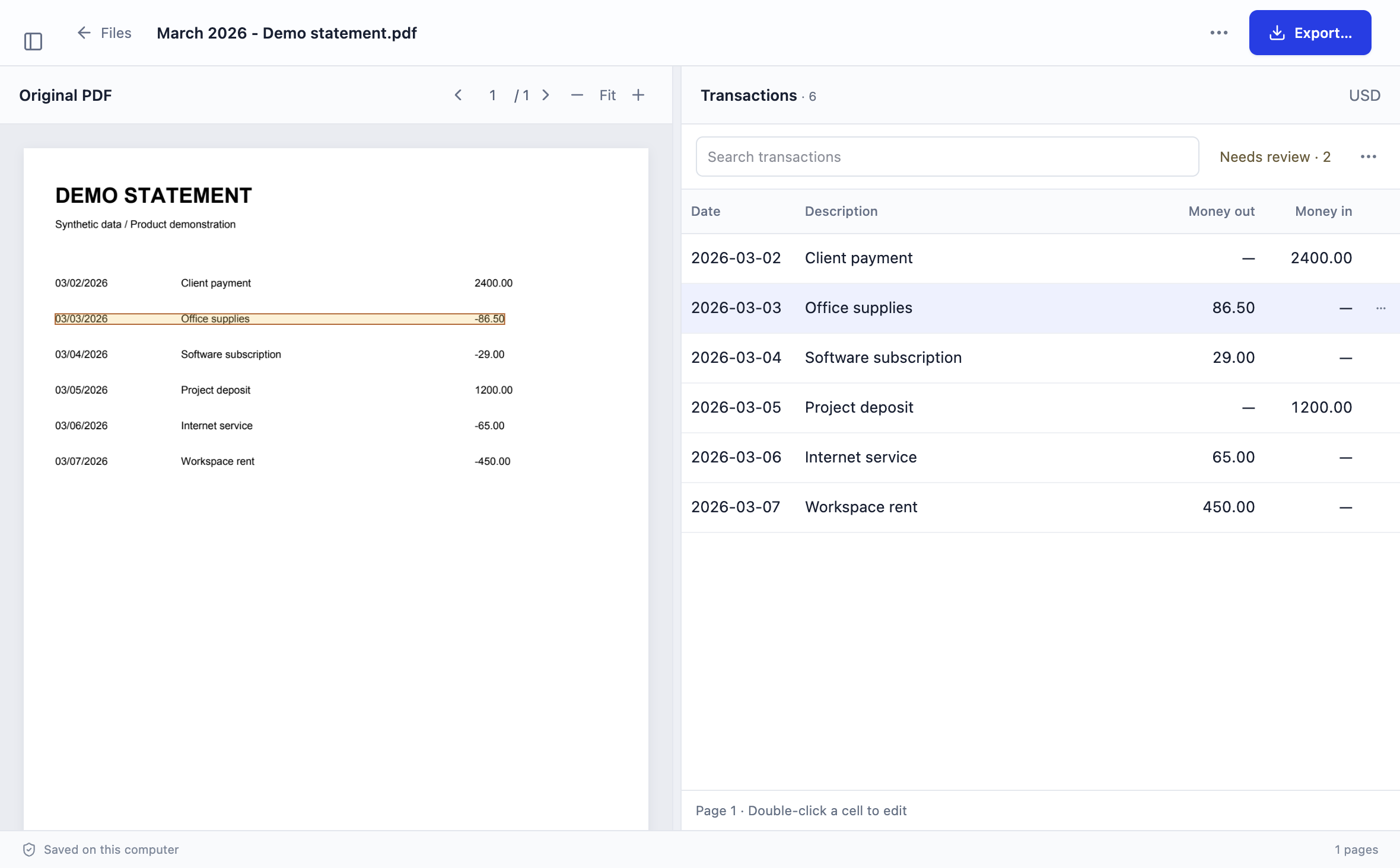
The cover screenshot shows Stmtio’s review workspace beside a synthetic statement. Compare dates, descriptions and money-in/money-out values. Correct fields and investigate missing or split rows. Scans use local OCR; unfamiliar layouts may need manual column mapping. There is no promise that every bank layout works automatically.
DocuClipper’s statement page also describes checking extracted totals against printed opening and closing balances. We have not tested that behavior. A balance check is useful, but you should still inspect individual rows and confirm the destination account and period. DocuClipper’s documented reconciliation workflow
3. Export and inspect the handoff

Actual Stmtio export interface using synthetic demo data. The warning is a prompt to review, not proof that every included row has been checked.
Choose CSV or XLSX for your destination. Standard exports contain Date, Description, Amount, Currency and Review status. Excluded rows are omitted, but unreviewed rows are not automatically excluded. Review the warning before proceeding. The current transaction export supports USD.
Use the statement review checklist to compare row counts, signed amounts and balances. The CSV vs Excel guide explains the format tradeoffs.
Separate file export from accounting integration
Downloading a CSV is not the same as posting transactions into an accounting account. Stmtio’s QuickBooks Online option creates a three-column CSV for a manual import. Check the account, date order, positive/negative signs, duplicates and preview before accepting rows. Follow the QuickBooks import guide and format examples. We have not verified an import in a live QuickBooks account for this comparison.
DocuClipper advertises connected QuickBooks and Xero workflows and an API. These may be relevant if file handoffs are the bottleneck, but confirm the exact integration, permissions and plan with the provider. We have not connected a bookkeeping account to DocuClipper or validated its sync behavior. Official integration overview
Compare billing without a misleading cheapest claim
Compare the pages you expect to process, devices or users, review effort and required destination features. A low advertised rate does not establish the lowest cost for your actual task.
Stmtio includes 10 free pages in total. Its paid subscriptions are monthly, priced in USD, with page and device allowances shown on the current pricing section. The free allowance is not a recurring monthly allowance.
DocuClipper’s pricing page offers currency, page-volume and monthly/annual selectors. It advertises a 14-day trial, unlimited users and a shared page allowance. It says monthly unused pages do not roll over, while annual pages are provided upfront. Confirm trial export/sync access and the complete billed amount for your selected options. DocuClipper pricing and billing FAQ
We do not flatten an annually billed monthly-equivalent rate into a month-to-month price, and we have not completed a competitor checkout. Follow each provider’s current terms rather than treating this article as a price guarantee.
Choose around the work you need to finish
Evaluate Stmtio first when your priority is keeping statement processing local and checking transactions beside the PDF on a supported Windows or Mac computer. Allow time for manual corrections and destination validation. Read the current release notes and installer warnings before trying the unsigned preview.
Evaluate DocuClipper first when uploads are approved and your requirements extend to the additional document types or connected workflows it advertises. Its public product scope is broader than the current Stmtio preview; that is not proof of better results on your files. DocuClipper product overview
For either option, test a small authorized sample. Include a scanned page if relevant, a wrapped description, incoming and outgoing amounts, and a page boundary. Check every resulting row and the final import, not just whether a file downloads. Do not use customer documents in an evaluation without permission.
Common questions
Is Stmtio more accurate than DocuClipper?
We have not run a same-document accuracy or speed benchmark. Neither our screenshots nor provider marketing establish an accuracy winner. Test your representative layouts and check the results against the originals.
Does local processing mean Stmtio never needs the internet?
No. Statement content is processed locally, but sign-in, subscription and page-allowance checks require online services. Starting a fresh conversion requires a connection.
Does Stmtio export QBO files or sync directly to Xero?
Not in the current 0.1.0 preview. It exports CSV/XLSX and a separate QuickBooks Online three-column CSV. That CSV is not a QBO file or a direct integration.
Has this article tested DocuClipper’s review and integrations?
No. We reviewed the linked public pages, not a paid account or a live accounting integration. Unverified behavior is not a claim that a feature is absent.
Sources and check date
Author: Stmtio Team. First-party sources checked October 16, 2026:
- DocuClipper product overview — advertised scope, uploads and integration options.
- DocuClipper bank statement product — advertised exports and reconciliation workflow.
- DocuClipper security — hosting, retention and deletion statements.
- DocuClipper pricing — billing selectors, users, trial and page rules.
- Stmtio product workflow, release notes, pricing and data handling — current preview scope.
Product terms can change. Our editorial target is to recheck sources at least every 30 days and when materially revising a comparison. The date above records this review, not a hands-on benchmark or a promise of ongoing monitoring. Neither DocuClipper nor the named accounting platforms endorse this article.
TRY YOUR OWN WORKFLOW
Start with one statement.
Use your 10 free pages to check the fit. Review your transactions before relying on an export.
Download Stmtio ↗